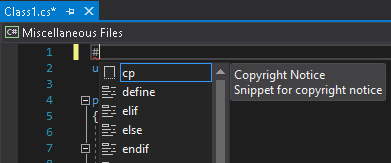
Are you tired of copy/pasting Copyright notice from one file to another? It requires you to context switch to another file, select and copy the notice, come back to the desired file and paste it. I have built a code snippet that can add the copyright notice to your file with a few keystrokes. Effectively it makes that “legal” task easier and more productive for the developers.
This post explains how to do one time set up and how to use it later with ease.
One time setup
-
- Download Copyright.snippet file from https://github.com/sameerkapps/CSharpCodeSnippets/blob/master/Copyright.snippet
- It is an XML file. Open it from Visual Studio. You will see the default notice with my name inside CDATA section.
- Change the notice as per your legal requirements and save it.
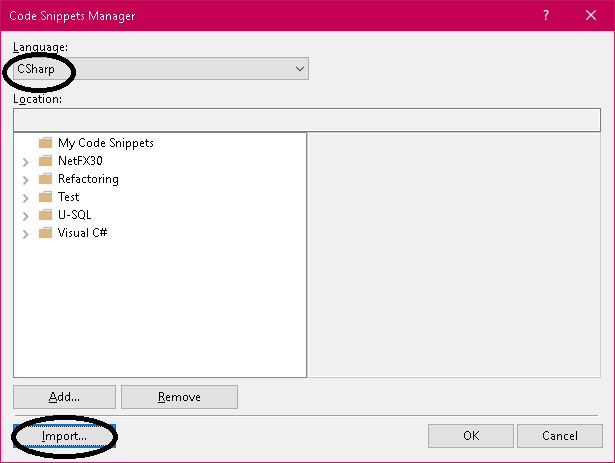
- In Visual Studio, click Tools -> Code Snippets Manager.

- When the dialog comes up
- Select CSharp language
- Click the Import button
-
-
- Choose the file that you saved in Step
- The remaining steps are self-explanatory.
-
You are done with the one time set up.
How to use it
In your .cs file:
-
-
-
- Type #cp
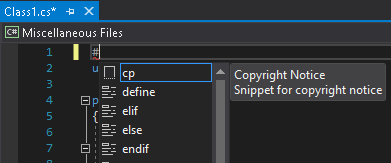
- Tab twice. And the notice will appear.
-
-
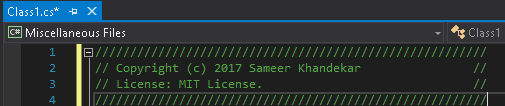
If the notice is not formatted to your satisfaction, you can make changes to the snippet file that you created in the setup and import it again.
 Sameer's Technology Blog